



Keeping Visibility Through Microsoft 365 Outages
Know What You Can Fix. Mitigate What You Can’t. Fast.
Visibility Through Microsoft 365 Outages
Know What You Can Fix. Mitigate What You Can’t. Fast.
The November 12–13 Microsoft 365 outage was another reminder of how heavily organizations depend on Microsoft’s cloud services – and how much operational impact service interruptions can have.
When Exchange Online and other Microsoft 365 workloads have issues, IT teams need to understand what is affected, how their environment is responding, and whether services are recovering.
But while organizations cannot directly influence Microsoft’s recovery efforts, they can monitor what is happening within their own Microsoft 365 environments.
And that’s exactly what the NiCE Active 365 Management Pack demonstrated during this incident.
Combine Synthetic Monitoring and Microsoft Service Health Insights for a Clearer Picture
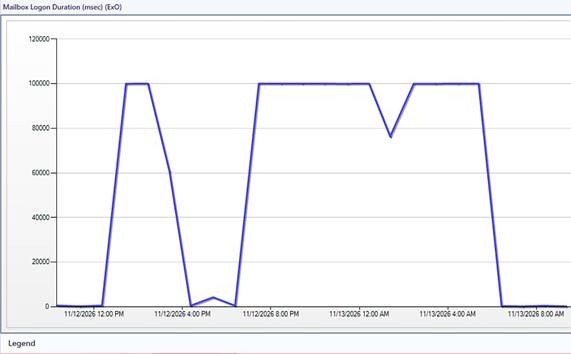
Running on Microsoft System Center Operations Manager (SCOM), the NiCE Active 365 Management Pack captured significant fluctuations in Exchange Online mailbox logon duration during the disruption.
One monitoring graph tells the story particularly well: mailbox logon duration climbed to approximately 100,000 milliseconds (100 seconds), repeatedly fluctuating throughout the incident. This provided a clear picture of the performance degradation experienced by users, rather than simply indicating that a service was unavailable.
Exchange Online mailbox logon duration during the November 12–13, 2026 Microsoft 365 disruption, captured by the NiCE Active 365 Management Pack in SCOM.
But another interesting detail emerged: while Exchange Online was experiencing severe performance issues, Microsoft Teams continued to respond normally in the monitored environment.
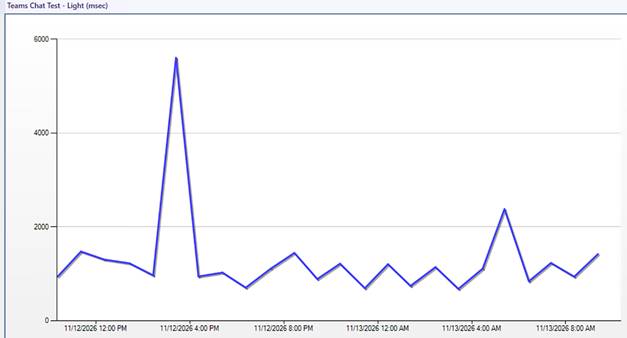
Microsoft Teams chat response time during the November 12–13, 2026 Microsoft 365 disruption, monitored through synthetic transactions by the NiCE Active 365 Management Pack in SCOM.
More Than Just Monitoring:
Understanding What’s Affected
This is where the combination of active and passive monitoring becomes particularly valuable.
The NiCE Active 365 Management Pack uses synthetic transactions to actively test Microsoft 365 applications and measure their actual responsiveness. This allows administrators to see how individual services behave from the perspective of their monitoring environment.
At the same time, the Management Pack captures Microsoft’s own Service Health notifications, making official incident information available directly within SCOM.

Microsoft’s notification of a Microsoft 365 Client Applications incident, captured by the NiCE Active 365 Management Pack and made available directly in SCOM.
During this outage, the solution captured Microsoft’s notification of a Microsoft 365 Client Applications incident, providing additional context alongside its own monitoring results.
Together, these two approaches give Microsoft 365 administrators a more complete picture: what their monitoring detects, which services are affected, which remain operational, and what Microsoft itself reports about the incident.
Visibility When You Cannot Control the Outage
No monitoring solution can prevent an outage originating within Microsoft’s infrastructure or accelerate the provider’s recovery efforts. But knowing what is happening across your own Microsoft 365 environment helps IT teams make informed decisions, distinguish provider-side issues from local problems, and communicate the impact to their organization.
While Microsoft worked to resolve the outage, the NiCE Active 365 Management Pack monitored its impact on users.