



Beyond NetApp ONTAP Storage Capacity Monitoring
Hardware Health and Infrastructure Resilience with Microsoft SCOM
Beyond NetApp ONTAP Storage Capacity Monitoring
Hardware Health and Infrastructure Resilience with Microsoft SCOM
Executive Summary
A storage system that reports green is not necessarily a healthy storage system. NetApp ONTAP is designed to keep serving data through fan failures, power supply faults, disk failures, and even the loss of a controller. That resilience is exactly why problems can stay invisible: the service keeps running while the protection behind it quietly erodes.
Most storage monitoring concentrates on capacity and performance. Both matter, but neither tells administrators whether the environment can survive its next failure. A cluster with one failed power supply, a disabled takeover partner and a degraded inter-site link may still show normal latency and plenty of free space. It is also one fault away from an outage.
This guide explains how physical component health, storage operations, and high-availability mechanisms work together to protect enterprise storage services. It shows how to build a monitoring strategy that covers all layers, and how Microsoft System Center Operations Manager (SCOM) can bring that information into the same operational view as servers, virtualization, applications, and business services.
Overview
Enterprise storage monitoring goes beyond capacity and performance. The health of NetApp ONTAP environments also depends on physical components, power supplies, cooling systems, connectivity, and high-availability mechanisms.
Undetected hardware faults or degraded redundancy can put critical services at risk, even when storage remains operational.
This whitepaper explores how comprehensive monitoring provides visibility into physical hardware health, storage operations, and MetroCluster resilience. It also examines practical monitoring strategies and the role of Microsoft SCOM in centralizing infrastructure health information. Discover how a more holistic approach helps IT teams identify risks earlier, strengthen operational resilience, and protect critical storage services.
Who this guide is for
The guide is written for storage administrators, infrastructure architects, and operations teams responsible for NetApp ONTAP environments, and for monitoring teams who integrate storage into an enterprise-wide SCOM deployment. It assumes working familiarity with ONTAP concepts such as nodes, HA pairs, aggregates, and storage virtual machines (SVMs).
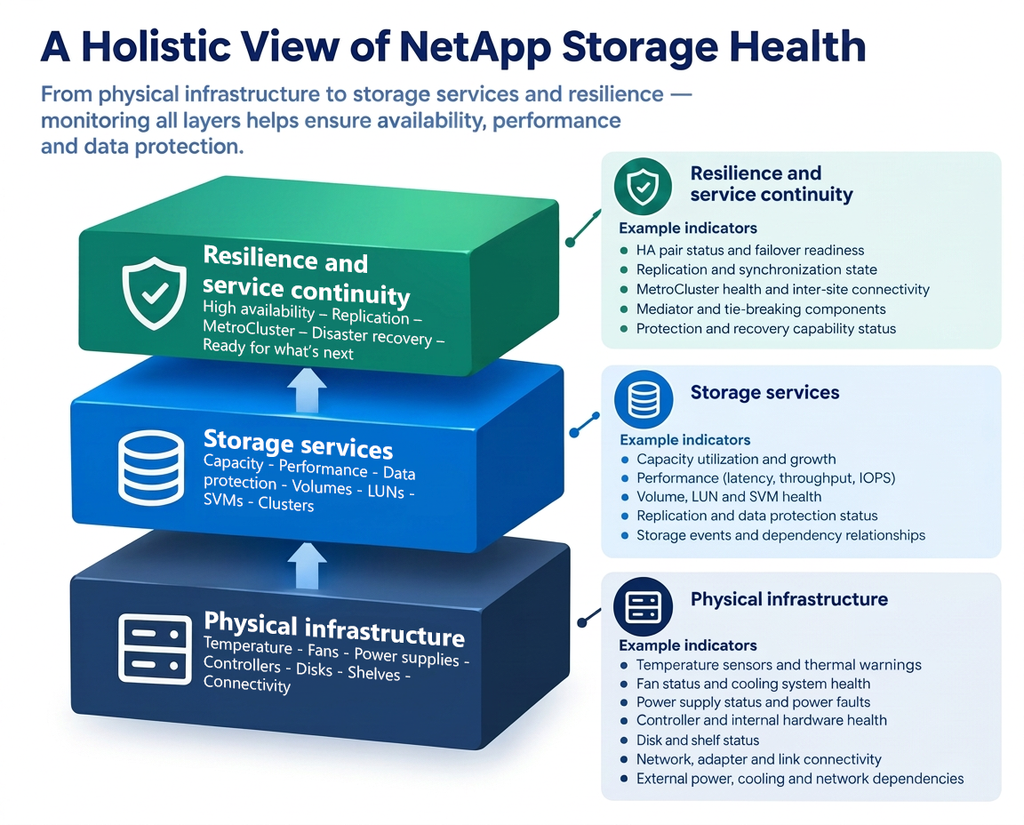
The Three-Layer Model
Throughout this paper, ONTAP monitoring is organized into three complementary layers. Each answers a different question.
| Layer | Question it answers | Typical scope |
| 1) Physical infrastructure | Is the underlying hardware healthy? | Temperature, fans, power supplies, controllers, disks, shelves, adapters, cabling and physical connectivity |
| 2) Storage services | Is the storage system operating correctly? | Aggregates, volumes, LUNs, SVMs, capacity, performance, replication, cluster health and data accessibility |
| 3) Resilience and service continuity | Can the environment withstand a failure? | Redundancy, HA failover readiness, MetroCluster health, inter-site connectivity, recovery readiness and remaining failure exposure |
The central argument is simple: monitoring only Layer 2 tells you how the system is performing today; monitoring all three tells you how close you are to an outage tomorrow. The value of comprehensive monitoring lies in making weaknesses visible before they turn into incidents.
Beyond Capacity and Performance
Capacity and performance metrics describe what a storage system delivers. They say little about the condition of the infrastructure delivering it. This distinction is the foundation of everything that follows.
What traditional storage monitoring covers
In many organizations, storage monitoring grew out of two practical questions: “Are we running out of space?” and “Is storage slowing down our applications?” As a result, dashboards typically focus on:
- Used and free capacity per aggregate and volume
- Growth trends and time-to-full forecasts
- Latency, IOPS, and throughput per volume, LUN, or node
- Snapshot reserve consumption and storage efficiency savings
These indicators are essential. They protect against the most visible storage incidents: full volumes and slow applications. But they are lagging indicators of hardware and resilience problems. By the time a physical fault affects latency or capacity, the system has usually already lost a layer of protection.
Why a system can be operational and still at risk
ONTAP is engineered for fault tolerance. Controllers are deployed in HA pairs. Shelves and controllers use redundant power supplies and fans. Disks are protected by RAID-DP or RAID-TEC, supported by hot spares. Network and storage paths are duplicated. MetroCluster extends this protection across sites.
Each of these mechanisms absorb a failure without interrupting service. That is precisely the point — and precisely the monitoring challenge. Consider these states, all of which can coexist with normal capacity and performance figures:
- One of two power supplies in a shelf has failed. The shelf runs on a single supply.
- Storage failover is disabled on an HA pair after maintenance and was never re-enabled.
- A RAID group is reconstructing onto the last available spare disk.
- One of two inter-site links in a MetroCluster configuration is down.
- A controller is running at elevated temperature because a fan is spinning below its expected speed.
None of these is an outage. Every one of them is a loss of protection. In each case, the next failure — a second power supply, a controller panic, another disk, the remaining link — is the one that users will notice.
Faults versus loss of protection
It is useful to distinguish between two categories of problems:
- Active faults directly affect service: a volume goes offline, an aggregate fails, a LUN becomes inaccessible, or latency rises beyond application tolerance.
- Loss of protection does not affect service yet but reduces the number of failures the environment can absorb: a failed redundant component, a disabled failover capability, a degraded RAID group, an unsynchronized mirror.
Capacity and performance monitoring is good at detecting active faults. Detecting loss of protection requires visibility into hardware state, redundancy status, and failover readiness. A mature monitoring strategy treats both categories as operationally significant, with response times appropriate to each.
Physical Hardware and Environmental Health
Layer 1 asks whether the hardware underneath ONTAP is healthy. Physical components rarely fail without warning, and most warnings appear long before data services are affected — if someone is looking.
Where hardware health information comes from
Before looking at individual components, understand that hardware data does not come from a single source. Depending on the platform and ONTAP version, administrators and monitoring tools draw on several mechanisms:
- ONTAP itself, which reports environmental sensor readings, chassis and shelf status, disk state, and health alerts through the CLI (for example
system node environment sensors show,storage shelf showandsystem health alert show), the ONTAP REST API and the Event Management System (EMS). - The Service Processor (SP) or Baseboard Management Controller (BMC), an out-of-band management controller on each node. It monitors sensors independently of ONTAP and remains reachable when a node is down, halted, or unresponsive.
- Shelf modules and bridges, such as I/O modules (IOMs) and, in some MetroCluster FC configurations, FC-to-SAS bridges, which report their own status and environmental data.
- AutoSupport and NetApp’s Digital Advisor (formerly Active IQ), which collect telemetry for analysis, risk detection, and support cases.
- SNMP traps and syslog forwarding, which push selected events to external systems.
Not every platform exposes every metric in the same way or through every interface. A monitoring design should therefore start with an inventory of which indicators are available on which platforms, through which interface — and which require a separate data source.
Temperature, thermal thresholds and cooling zones
Controllers and shelves contain multiple temperature sensors located at inlets, outlets, CPUs, memory, power supplies and I/O modules. Each sensor has platform-defined warning and critical thresholds. ONTAP compares readings against these thresholds and reports a sensor state such as normal, warning, or critical.
What matters operationally:
- Inlet temperature reflects the data center environment. A rise across several systems in the same row points to a facility issue, such as a failed CRAC unit or blocked airflow, rather than to the storage system.
- Internal and component temperatures reflect cooling performance inside the chassis. A rise on one system only suggests a local problem: a failing fan, a missing blank panel, or obstructed vents.
- Rate of change matters as much as absolute value. A steady climb over hours is an early warning. A rapid jump usually indicates a cooling failure.
ONTAP protects hardware by shutting down components or nodes that exceed critical thermal limits. That protection prevents damage, but it turns a cooling problem into an availability event. Thresholds should follow NetApp’s platform-specific values rather than universal limits invented for monitoring convenience.
Fans, fan speeds and cooling redundancy
Fans are designed with redundancy: a chassis or shelf can typically tolerate the loss of a fan or fan module while maintaining safe temperatures, often by increasing the speed of the remaining fans.
Key indicators are fan status (operational or failed), fan speed relative to expected range, and fan module presence. A fan running consistently below its expected RPM is a predictive warning of mechanical wear. A fan running consistently at high speed while other systems in the room run normally suggests the chassis is compensating for something — a failed neighboring fan, a blocked intake, or a hot aisle problem.
A single failed fan is rarely urgent from a performance perspective. It is urgent from a redundancy perspective: the cooling margin is now consumed.
Power supplies, power input, voltage and redundant feeds
Controllers and shelves use redundant power supply units (PSUs), which are normally connected to separate power distribution units and, ideally, separate power feeds. Monitoring should cover:
- PSU status: present, operational, failed, or missing
- Input power: whether each PSU is receiving power. A PSU that is healthy but has lost input indicates a PDU, cable, or feed problem rather than a hardware fault.
- Voltage sensors: readings on internal voltage rails, with platform-defined thresholds
- Feed distribution: whether redundant PSUs are actually connected to independent feeds — a configuration fact that monitoring alone cannot always confirm, but that should be verified during validation
The classic hidden risk is a system in which both PSUs are healthy but connected to the same PDU. Every monitor reports green, yet a single PDU failure takes the system down. Monitoring makes PSU failures visible; regular configuration audits make shared-feed risks visible.
Controllers, memory, adapters and hardware fault indicators
Each node’s controller module contains CPUs, memory, NVRAM or NVMEM, a battery or similar backup mechanism protecting cached writes, and expansion adapters for networking and storage connectivity.
Relevant indicators include:
- Node status, uptime, and unexpected reboots or panics
- Correctable memory errors, which may indicate a degrading DIMM before it fails outright
- NVRAM or NVMEM battery health and charge status — a failed battery can affect write protection and may cause ONTAP to change node behavior to protect data
- Adapter and port status, including link state, errors and speed negotiation on Ethernet, Fibre Channel and SAS ports
- Hardware health alerts raised by ONTAP’s health monitors and by the SP or BMC
Controller faults are among the most significant hardware events because they affect the HA pair as a whole. This is covered further in Chapter 4, Redundancy, High Availability, and Failure Scenarios.
Disks, shelves, I/O modules, cabling and connectivity
Disks and shelves form the physical foundation of every aggregate. Monitoring should cover:
- Disk state: present, in use, spare, failed, broken, or being reconstructed
- Predictive disk failure: ONTAP can fail a disk proactively based on health indicators and copy its data to a spare before an actual failure occurs (Rapid RAID Recovery)
- Spare availability: the number and type of spares compatible with each aggregate
- Shelf status: shelf modules, IOMs, PSUs, fans and temperature sensors in each shelf
- Cabling and path redundancy: whether each disk is reachable over multiple paths, as reported by ONTAP’s disk path information or by NetApp Config Advisor checks
- Port and link errors on SAS, NVMe and FC connections
A disk that is reachable over only one path still works. It is no longer protected against the loss of a cable, IOM, or adapter.
Environmental risks, component degradation and predictive warning signs
Many hardware failures are preceded by detectable patterns:
| Warning sign | What it may indicate |
| Gradual temperature rise on one system | Fan wear, airflow obstruction or dust accumulation |
| Temperature rise across many systems | Facility cooling issue |
| Fan speed below expected range | Mechanical fan degradation |
| Increasing correctable memory errors | Degrading memory module |
| Repeated port errors or link flaps | Failing cable, SFP, adapter or switch port |
| Rising disk error counts or media errors | Disk nearing failure |
| Battery charge below normal | Backup battery reaching end of life |
| PSU healthy but without input power | PDU, cable or power feed issue |
Treating these signals as trend data — not only as threshold alerts — allows teams to schedule replacement during planned maintenance instead of reacting to failures.
Interpreting warnings and failures
Not every hardware alert carries the same weight. A practical interpretation model:
- Informational: a reading is approaching a threshold, or a component has recovered. Track the trend.
- Warning: a redundant component has failed, or a sensor has crossed its warning threshold. Service is unaffected, but protection is reduced. Plan a fix within the support window.
- Critical: a sensor has crossed its critical threshold, a non-redundant path has failed, or a second redundant component is affected. Service is at immediate risk. Respond now.
The question to ask of every hardware alert is not only “What failed?” but “What would happen if the next component failed too?”
Storage System Health: From Hardware to Data Services
Layer 2 asks whether the storage system is operating correctly. This is the layer most teams already monitor — but its indicators are far more useful when they are read alongside the hardware beneath them.
Disks, RAID groups and aggregates
Aggregates are the bridge between physical disks and logical storage. Each aggregate consists of one or more RAID groups protected by RAID-DP (double parity) or RAID-TEC (triple parity). Key states to monitor:
- Aggregate state: online, offline, or restricted
- RAID status: normal, degraded (a disk has failed and parity is protecting data), reconstructing, or — in the worst case — failed
- Reconstruction progress and duration: during reconstruction, performance may be affected, and protection is reduced
- Spare availability relative to the disk types and sizes in each aggregate
- Aggregate capacity and growth, including physical used space after storage efficiency
- Mirror status for SyncMirror plexes in MetroCluster configurations
A degraded RAID-DP group can tolerate one more disk failure. A degraded RAID-TEC group can tolerate two more. Knowing which of your aggregates are in which state — and how quickly reconstruction completes — is the difference between a routine disk replacement and a data-loss risk.
Controllers, nodes and HA pairs
At the storage services layer, nodes are evaluated for their ability to serve data:
- Cluster interconnect and HA interconnect status
- Node health and eligibility within the cluster
- HA pair status and storage failover state (covered in Chapter 4, Redundancy, High Availability, and Failure Scenarios)
- CPU utilization and node-level latency
- Cluster quorum and the health of the cluster network
Volumes, LUNs and SVMs
Storage virtual machines (SVMs) present data to clients through volumes, LUNs, NAS shares and namespaces. Monitoring should cover:
- SVM state and the state of its protocols (NFS, SMB, iSCSI, FC, NVMe)
- Volume state: online, offline or restricted
- Volume capacity: used space, free space, snapshot reserve consumption, autogrow behavior and space guarantees
- Inode utilization: a volume can run out of inodes while still showing free space, which stops new files from being created
- LUN state and mapping status
- Logical interfaces (LIFs): operational status, and whether each LIF resides on its home port and node
A LIF that is not on its home port is a subtle but important indicator. It often means that a failover occurred — of a port, a node, or a network path — and that the environment is now running in a non-default configuration that may have less redundancy than intended.
Capacity, latency, throughput and IOPS
Performance and capacity remain central to storage health. The key metrics are:
| Metric | Why it matters |
| Latency (read, write, other) | The best single indicator of user and application experience |
| IOPS | Workload intensity; changes can signal new workloads or runaway processes |
| Throughput (MB/s) | Bandwidth consumption, especially for backup, analytics and streaming workloads |
| Node CPU and utilization headroom | Whether a node can absorb its partner’s workload during takeover |
| Aggregate and volume free space | Risk of write failures and service interruption |
| Growth rate and time-to-full | Planning horizon for capacity expansion |
Node headroom deserves special attention. In an HA pair, each node must be able to carry the combined workload of both nodes during takeover. A pair in which both nodes routinely run at 70% utilization is healthy today but may become overloaded the moment failover occurs.
Replication and data protection
Data protection relationships are a storage service in their own right. Monitoring should include:
- SnapMirror relationship state and health
- Lag time against recovery point objectives (RPOs)
- Last successful transfer, transfer failures and transfer duration
- Snapshot schedules, policy compliance and snapshot age
- SnapMirror active sync (formerly SnapMirror Business Continuity) relationship status where used
A replication relationship that is “healthy” but has not transferred successfully for two days no longer meets most RPOs. Lag time, not just state, is the indicator that matters.
Storage events and the Event Management System
ONTAP’s Event Management System (EMS) records events across all layers, from sensor warnings and disk failures to volume state changes and replication errors. Each event carries a severity level, ranging from EMERGENCY and ALERT through ERROR and NOTICE to INFORMATIONAL and DEBUG.
EMS is a rich source of information but produces a high volume of messages. Effective monitoring filters EMS events by relevance and severity, and maps them to actionable alerts rather than forwarding every message.
How physical faults appear as service symptoms
One of the most valuable skills in storage operations is recognizing when a Layer 2 symptom has a Layer 1 cause:
| Service symptom | Possible physical cause |
| Rising latency on one aggregate | RAID reconstruction after a disk failure; a failing disk causing retries |
| Rising latency on all volumes of one node | Node under thermal stress; adapter errors; partner takeover load |
| Intermittent client access errors | Port or cable faults causing LIF migration or link flaps |
| Reduced throughput on a shelf stack | Loss of a path, forcing all I/O through the remaining path |
| Write performance degradation | NVRAM or battery issues affecting write caching behavior |
When teams monitor only Layer 2, they see the symptom and begin troubleshooting at the application, network, or volume level. When they monitor Layer 1 as well, the cause is often visible immediately.
Redundancy, High Availability, and Failure Scenarios
Layer 3 asks whether the environment can withstand its next failure. This is where hardware status and storage service status come together into a single question: how much protection is left?
Controller failover in HA pairs
In an ONTAP HA pair, each node owns its own storage but is connected to its partner’s storage as well. If one node fails, or is taken down for maintenance, its partner takes over its storage and continues serving data. When the failed node returns, giveback restores normal operation.
Failover readiness depends on several conditions, all of which should be monitored:
- Storage failover enabled: takeover is possible only when storage failover is enabled on both nodes
- Takeover possible: ONTAP reports whether the partner is currently able to take over (
storage failover show) - HA interconnect status: the link that mirrors NVRAM contents between partners must be healthy
- Giveback state: whether aggregates have been returned to their home node after a takeover
- Partner health: a node can only take over if it is itself healthy and has sufficient headroom
A common and dangerous state is an HA pair where takeover is not possible — for example because storage failover was disabled during maintenance, because the HA interconnect is down, or because a giveback is incomplete. Both nodes continue to serve data normally. Until the condition is resolved, the next controller failure becomes an outage for that node’s data.
Redundant power, cooling and paths
Redundancy is designed into every layer of the hardware:
| Component | Redundancy mechanism | Loss of protection when… |
| Power supplies | Two or more PSUs per controller and shelf | One PSU fails or loses input power |
| Power feeds | PSUs connected to separate PDUs and feeds | Redundant PSUs share one PDU or feed |
| Fans | Multiple fans or fan modules per chassis | One fan fails or runs below expected speed |
| Disk paths | Multipath HA cabling to each shelf | A disk or shelf is reachable over a single path |
| Network ports | Interface groups and LIF failover groups | A port is down, or LIFs have no failover target |
| Cluster network | Redundant cluster switches and ports | A cluster port or switch is down |
| Disk protection | RAID-DP / RAID-TEC plus spares | A RAID group is degraded or no compatible spares remain |
Each row represents a case in which the service is unaffected, but one more failure would have consequences.
Degraded RAID protection
RAID protection is the redundancy mechanism closest to the data itself. Its state changes through a predictable sequence:
- Normal: all disks healthy, spares available
- Degraded: a disk has failed; data remains accessible through parity
- Reconstructing: data is being rebuilt onto a spare; performance may be affected
- Normal again: reconstruction complete, but the spare pool is now smaller
Monitoring should flag each transition. It should also flag the condition that turns a routine event into a serious one: no compatible spare available, so reconstruction cannot start and the RAID group remains degraded.
Single points of failure
Even well-designed environments can contain single points of failure, often introduced unintentionally:
- Both PSUs of a system connected to the same PDU
- A shelf stack cabled with single-path connectivity after a maintenance activity
- A LIF failover group that contains only ports on one node or one switch
- An HA pair where both nodes are connected to the same upstream network switch
- A single cluster switch in a switched cluster configuration
- An aggregate built from disks in one shelf without SyncMirror protection
Some of these are visible to monitoring. Others are configuration facts that require periodic validation, for example with NetApp Config Advisor or Digital Advisor risk reports.
Active fault or loss of protection?
The distinction introduced in Chapter 1, Beyond Capacity and Performance, becomes practical here. When an alert arrives, operations teams should ask two questions:
- Is data access or performance affected right now? If yes, it is an active fault.
- Has the environment lost the ability to absorb a further failure? If yes, it is a loss of protection.
Many alerts answer “no” to the first question and “yes” to the second. Those are the alerts most often ignored — and the ones that most often precede outages.
Failure scenarios
Scenario 1: The fan that was “only a warning”
A fan in a controller chassis fails. ONTAP raises a warning, the remaining fans spin up, and temperatures stay within limits. The alert is acknowledged and scheduled for the next maintenance window. Two weeks later, a summer heat wave raises data center inlet temperature by several degrees. With no cooling margin left, internal temperatures cross critical thresholds, and ONTAP shuts the node down to protect the hardware. Its partner takes over — but it is now carrying the full workload during peak business hours.
The lesson: a failed redundant component is not an isolated event. Its significance depends on what else might change before it is replaced.
Scenario 2: Failover that could not happen
During a firmware upgrade, storage failover was disabled on an HA pair to complete a manual step. The upgrade succeeded, but failover was never re-enabled. Monitoring tracked node health, capacity, and latency — all normal. Three months later, a node panicked because of a hardware fault. Because takeover was not possible, all volumes owned by that node became unavailable until it was repaired.
The lesson: failover readiness must be monitored as an explicit state, not assumed from node health.
Scenario 3: One fault, many alerts
A SAS cable between a controller and a shelf stack is damaged. Within minutes, the monitoring system raises alerts for path errors on several disks, a shelf connectivity warning, increased latency on two aggregates, and a non-redundant path condition. Without correlation, operators see four separate problems and may start investigating disks or workloads. With correlation, they see one root cause — a single cable — and one consequence: the shelf stack is now running on one path.
The lesson: effective monitoring separates root causes from symptoms, as discussed in Chapter 6, Designing an Effective Monitoring Strategy.
MetroCluster: Monitoring Resilience Across Sites
MetroCluster extends ONTAP’s high-availability model across two sites, providing synchronous mirroring and the ability to switch operations from one site to the other. It is the clearest example of why healthy components do not guarantee a healthy configuration: every cluster can be green while the disaster-recovery capability is already impaired.
MetroCluster in brief
In a MetroCluster configuration, two clusters at separate sites are paired. Data is mirrored synchronously between sites using SyncMirror, and NVRAM contents are mirrored to a disaster-recovery (DR) partner at the remote site. If one site fails, the surviving site performs a switchover and serves data for both. After the failed site is restored, healing and switchback return the configuration to normal operation.
MetroCluster is available in several architectures, and monitoring must account for their differences:
- MetroCluster IP uses IP-based back-end connectivity through dedicated MetroCluster IP switches for storage mirroring and NVRAM replication.
- MetroCluster FC (fabric-attached) uses Fibre Channel switch fabrics, FC-VI adapters and, depending on the shelf technology, FC-to-SAS bridges.
- Stretch MetroCluster connects sites over shorter distances with direct cabling rather than switch fabrics.
The components to monitor — and the interfaces that expose them — differ between these variants. A monitoring design should be built for the specific architecture in use.
Cluster and node health at both sites
Each site contains a fully functional ONTAP cluster. Everything covered in Chapters 2 to 4 applies at both sites independently: hardware health, aggregate status, HA pair failover readiness and storage services.
In a MetroCluster context, however, local issues have wider implications. An HA pair at Site B that cannot perform local takeover may also affect the configuration’s ability to handle certain combined failure scenarios. Monitoring should present both sites together so that operators can see the combined state, not two independent views.
Inter-site links, switches, fabrics and connectivity
The connections between sites are the backbone of MetroCluster. Depending on architecture, they include:
- MetroCluster IP switches and their inter-switch links (ISLs)
- FC switches, fabrics and ISLs in fabric-attached configurations
- FC-to-SAS bridges where used
- The links carrying NVRAM mirroring and storage replication traffic
- The cluster peering network used for configuration replication
Monitoring should cover link state, error rates, latency, and bandwidth utilization. Loss of one of two redundant ISLs does not interrupt mirroring, but it removes redundancy from the most critical path in the configuration. Rising latency on inter-site links can also affect write performance, because synchronous mirroring requires writes to be committed at both sites.
Replication and synchronization status
MetroCluster relies on several synchronization mechanisms, each of which can become degraded independently:
- SyncMirror plex status: each mirrored aggregate has a local and a remote plex. If one plex is offline or resynchronizing, the aggregate is not fully mirrored.
- NVRAM mirroring to the DR partner
- Configuration replication between clusters, which keeps SVM and other configuration data consistent across sites
- Unmirrored aggregates: aggregates intentionally or unintentionally created without mirroring are not protected by switchover
An aggregate that is online and serving data but has a degraded plex is a textbook example of a loss of protection: the data is intact, but a site failure would now cause data unavailability for that aggregate.
Mediator and tiebreaker health
Depending on configuration, MetroCluster can use an external witness to help determine whether a site has failed:
- ONTAP Mediator is used with MetroCluster IP configurations and supports mediator-assisted automatic unplanned switchover (MAUSO).
- MetroCluster Tiebreaker software monitors both sites from a third location and can detect site failures and, depending on configuration, initiate switchover.
The witness itself must be monitored. A Mediator or Tiebreaker that has lost connectivity to one or both clusters does not affect normal operation. It does affect the configuration’s ability to respond automatically to a site failure — which is often the very scenario MetroCluster was purchased for.
Switchover readiness, degraded protection and recovery
The key Layer 3 question for MetroCluster is: if a site failed now, would switchover succeed? ONTAP provides built-in validation through commands such as metrocluster check run and metrocluster check show, which test the configuration across nodes, aggregates, clusters, connections, and other components. The metrocluster show and metrocluster operation show commands report configuration state and the status of the most recent operation.
Monitoring should track:
- Overall MetroCluster configuration state and mode (normal, switchover, partial switchback)
- Results of periodic MetroCluster checks
- Automatic unplanned switchover (AUSO or MAUSO) capability
- Status of the last switchover, healing, or switchback operation
- DR group and DR partner health
After any switchover, the configuration runs with no remote protection until healing and switchback are complete. Monitoring should make this extended state highly visible.
Dependencies that can undermine disaster-recovery capability
MetroCluster resilience can be undermined by dependencies outside the storage systems themselves:
- Inter-site links that share a physical route, conduit or carrier
- Mediator or Tiebreaker hosts that depend on infrastructure at one of the two sites
- Shared power, cooling or network infrastructure between “independent” sites
- Name services, authentication or management infrastructure available at only one site
- Host multipathing or application configurations that cannot reach storage at the surviving site
Some of these dependencies can be monitored directly; others require architecture reviews and DR testing.
Healthy systems, unhealthy configuration
The central lesson of this chapter: two healthy clusters do not automatically make a healthy MetroCluster. Consider a configuration in which both clusters report normal status, all nodes are up, all aggregates are online, and performance is normal — while one ISL is down, one aggregate’s remote plex is resynchronizing, and the Mediator has lost contact with Site B. Each issue on its own is a warning. Together, they mean that a site failure at that moment could result in data unavailability and require manual intervention. Only monitoring that evaluates the configuration as a whole makes that combined risk visible.
Designing an Effective Monitoring Strategy
Collecting data is the easy part. The value of monitoring lies in turning that data into a small number of accurate, actionable alerts — and in making sure nothing important is missing. This chapter covers the design decisions that determine whether monitoring helps operations teams or overwhelms them.
Monitoring interfaces and data sources
A robust strategy combines several data sources, each with a distinct role:
| Data source | Typical use | Considerations |
| ONTAP REST API | Inventory, state, capacity, performance and health data | NetApp’s strategic API; the legacy ONTAPI (ZAPI) interface is being phased out |
| EMS events | Real-time notification of faults and state changes | High volume; requires filtering and severity mapping |
| SNMP traps | Push-based notification to existing tools | Coverage depends on configuration and MIB support |
| Service Processor / BMC | Out-of-band hardware data, node access when ONTAP is down | Platform-specific; separate network and credentials |
| AutoSupport and Digital Advisor | Telemetry, risk analysis, support integration | Analytical rather than real-time |
| NetApp management tools (e.g. Unified Manager) | ONTAP-specific dashboards, analytics and event management | Storage-focused; usually separate from enterprise monitoring |
| MetroCluster checks and Tiebreaker / Mediator status | DR configuration validation and witness health | Architecture-specific |
The monitoring design should document which indicators come from which source, and which indicators are not covered by any source currently in use.
Polling intervals
Polling frequency is a trade-off between detection speed and load on both the storage system and the monitoring infrastructure:
- State and health checks (node, HA, aggregate, volume, hardware status) benefit from short intervals — typically a few minutes — so that faults are detected quickly.
- Performance metrics should be collected at an interval that captures meaningful trends without generating excessive data.
- Capacity and inventory data changes slowly and can be collected less frequently.
- Event-driven sources such as EMS forwarding or SNMP traps complement polling by reporting critical events immediately.
Intervals should be tuned to the size of the environment and validated against both detection-time objectives and system load.
Thresholds
Thresholds fall into two categories:
- Hardware thresholds for temperature, voltage and fan speed are defined by NetApp for each platform and reported by ONTAP as sensor states. Monitoring should use these vendor-defined states rather than invent its own universal limits.
- Service thresholds for capacity, latency, lag time and utilization depend on the environment and its workloads. They should be based on service-level objectives, observed baselines, and application requirements.
For capacity, combining a static threshold (for example, 85% used) with a trend-based forecast (for example, full within 14 days) produces more useful alerts than either approach alone. For latency, thresholds should reflect what each workload can tolerate: a database volume and an archive volume have very different expectations.
Alert severity
A consistent severity model helps teams respond appropriately:
| Severity | Meaning | Examples | Expected response |
| Critical | Service affected or at immediate risk | Aggregate offline, node down without takeover, volume full, MetroCluster switchover failure | Immediate |
| Warning | Loss of protection, service unaffected | Failed PSU or fan, takeover not possible, degraded RAID, ISL down, Mediator unreachable | Same business day or within support window |
| Informational | Trend or state change worth recording | Capacity growth, completed reconstruction, successful giveback | Review during routine checks |
The severity model should reflect operational significance, not only the severity assigned by the source event. A “warning” that indicates loss of the last redundant path may deserve critical treatment in a specific environment.
Dependency-aware alerting
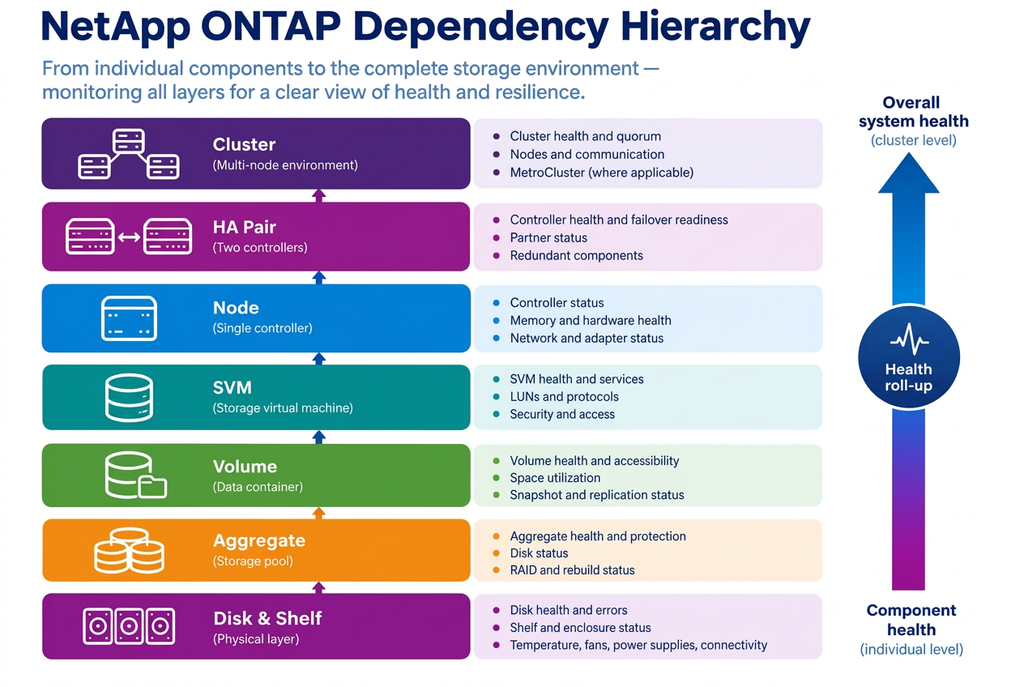
Storage components depend on each other in a clear hierarchy: disks belong to shelves and aggregates, aggregates host volumes, volumes belong to SVMs, SVMs serve data through LIFs on nodes, and nodes form HA pairs and clusters.
Dependency-aware monitoring uses this hierarchy to:
- Roll up component health to the parent object, so a cluster shows as degraded when one of its nodes is degraded
- Suppress or group child alerts when a parent has failed — for example, avoiding dozens of volume alerts when an entire node is down
- Show operators the impact of a fault on the objects and services that depend on it
Event correlation
Correlation identifies when multiple alerts share one underlying cause. Examples include:
- Several disk path errors on the same shelf stack, indicating a cable, IOM, or adapter fault
- Latency increases on all aggregates owned by a node following a takeover
- Temperature warnings on multiple systems in the same rack, indicating a facility issue
- Replication lag rising on many relationships at the same time, indicating a network or destination-side problem
Good correlation reduces noise and accelerates root-cause analysis. It also helps avoid the opposite mistake — dismissing a genuine loss of redundancy as “just another warning” among many.
Escalation and notification
Alerts should reach the right people through the right channel:
- Route storage alerts to the storage team, and facility-related alerts (such as inlet temperature or power input loss) to data center operations as well
- Integrate with IT service management tools so that alerts create, update, and close incidents automatically
- Define escalation paths for alerts that remain unacknowledged or unresolved
- Ensure every notification states what is affected, what the likely impact is, and what action is expected
An actionable notification answers three questions: what happened, why it matters, and what to do next.
Historical trends and dashboards
Historical data supports capacity planning, performance analysis, and predictive maintenance. Useful views include:
- Capacity growth per aggregate and volume, with time-to-full forecasts
- Latency and throughput trends per node, aggregate and critical volume
- Hardware sensor trends, such as temperature and fan speed over time
- Replication lag trends for critical relationships
- Redundancy status over time: how often, and for how long, the environment ran with reduced protection
Dashboards should be organized by audience. Operations teams need current state and open issues. Storage architects need trends and headroom. Management needs service-level summaries and risk exposure.
Distinguishing information from action
A practical test for every alert rule: if this alert fires at 3 a.m., does someone need to act? If yes, it should be an actionable alert with clear severity and ownership. If not, it should be recorded as an event or trend for later review. Rules that consistently fail this test should be tuned, consolidated, or removed. Alert fatigue is not just an annoyance — it is one of the most common reasons genuine warnings are missed.
Centralized with Microsoft SCOM
Storage does not fail in isolation, and it should not be monitored in isolation. When ONTAP health is visible in the same platform as servers, hypervisors, databases, and business applications, operations teams can see not only that a storage component has a problem, but which services it affects.
Why storage belongs in enterprise monitoring
Many organizations run NetApp’s own management tools alongside an enterprise monitoring platform. Storage-specific tools offer deep ONTAP analytics and are valuable for storage specialists. But when storage is monitored only in a separate console, several problems arise:
- Storage alerts are not visible to the operations center that handles all other incidents
- Correlation between storage events and application or virtualization symptoms depends on manual investigation
- Alert routing, escalation, and ticketing follow different processes for storage than for the rest of IT
- Service-level views cannot include the storage layer
Microsoft System Center Operations Manager (SCOM) is the established monitoring platform in many Windows-centric and hybrid enterprises. Extending it to ONTAP ensures that storage does not become an isolated monitoring island.
How ONTAP monitoring complements the rest of the stack
When ONTAP is monitored in SCOM, storage health can be viewed alongside the layers that depend on it:
- Servers: Windows and Linux hosts using iSCSI, FC or NVMe LUNs, or SMB and NFS shares
- Virtualization: VMware vSphere and Microsoft Hyper-V datastores and cluster shared volumes hosted on ONTAP
- Applications and databases: SQL Server, Oracle, Exchange and file services whose performance depends on storage latency
- Business services: distributed applications that model end-to-end service health, including the storage layer
This makes it possible to answer cross-layer questions quickly. Is the slow database caused by the server, the hypervisor, or the storage? Which business services are affected by this aggregate’s degraded RAID group? Which applications run on the HA pair that currently cannot fail over?
Understanding the three types of capability
To set realistic expectations, it is important to distinguish three different kinds of capability:
- Native ONTAP capabilities: the health monitors, sensor states, EMS events, MetroCluster checks, and APIs that ONTAP itself provides. These determine what information exists in the first place.
- Hardware-management interfaces: the Service Processor or BMC, shelf modules and bridges, which provide out-of-band and platform-specific data. Some of this information is also surfaced through ONTAP; some is available only through the hardware interface.
- Monitoring-platform capabilities: what a monitoring solution does with the information — discovery, health models, roll-up, alerting, correlation, dashboards, reporting and integration with IT service management.
No single interface exposes every metric discussed in this guide. A monitoring architecture should be explicit about which layer each indicator comes from and how it reaches the operations team.
Where the NiCE NetApp ONTAP Management Pack fits
The NiCE NetApp ONTAP Management Pack brings ONTAP monitoring into Microsoft SCOM. It supports SCOM 2019, 2022, and 2025, as well as Azure Monitor SCOM Managed Instance. It connects to ONTAP clusters, discovers their components, and represents them as SCOM objects with health states, performance data, and alerts.
Mapped to the three-layer model, the Management Pack provides coverage in each layer:
| Layer | Coverage in the NiCE NetApp ONTAP Management Pack |
| Physical infrastructure | Discovery of chassis, shelves and disks; monitors for overheating, failed power supplies and failed fans; Ethernet and Fibre Channel port monitoring |
| Storage services | Clustered appliance, node, aggregate, SVM and volume monitoring; space, IOPS, latency and throughput data; inode utilization; free-space combo monitors; event monitoring |
| Resilience and continuity | Monitors for restarted nodes; SnapMirror relationship monitoring including lag time; sync time monitoring; summary monitors for large environments |
| Security and operations | SSL certificate monitoring for ONTAP clusters and Active IQ; tracking of access and system changes; connection and alert self-monitoring views |
What this means in practice
With ONTAP monitored in SCOM, the scenarios described in earlier chapters play out differently:
- A failed fan or power supply raises a SCOM alert with product knowledge, routed through the same notification and ticketing process as every other infrastructure alert.
- A SnapMirror relationship falling behind its RPO is detected through lag-time monitoring, not discovered during a restore.
- An inode shortage on a file share volume is flagged before users receive “disk full” errors on a volume that still shows free space.
- A storage latency increase can be viewed alongside the affected SQL Server or VMware workloads, shortening root-cause analysis.
- Organizations can extend monitoring through SCOM’s standard customization mechanisms, such as additional EMS-based rules, to cover environment-specific requirements.
The result is a single operational view in which storage health — physical, logical, and resilience-related — is part of enterprise service monitoring rather than a separate silo.
Monitoring Synchronization as a Business Requirement
Transport and apply lag are technical metrics, but business requirements ultimately determine their importance.
For a critical application, the question may be:
- How much data can the business afford to lose?
- For another workload, the question may instead be: How quickly must the service be recovered?
These requirements are typically expressed through recovery objectives. Monitoring thresholds should support these objectives.
Align monitoring with recovery requirements
Consider three example environments.
Tier 1 financial workload
The organization requires minimal data exposure. Monitoring may use very strict thresholds and rapid escalation when synchronization degrades.
Business-critical enterprise application
Some temporary lag may be acceptable, particularly during defined processing periods. Monitoring may distinguish between short spikes and sustained degradation.
Non-critical reporting environment
A larger synchronization delay may be operationally acceptable. Monitoring should still detect unexpected failures but may use less aggressive lag thresholds.
Practical Checklist and Conclusion
Use this checklist to assess current monitoring coverage and identify gaps. Each item should be answered with a clear “yes, and we have verified it” — not “we assume so.”
Physical health
- Temperature sensor states are monitored for all controllers and shelves, using platform-defined thresholds
- Fan status and fan speed anomalies are monitored
- PSU status and input power are monitored for every controller and shelf
- Redundant PSUs are verified to be connected to independent PDUs and feeds
- Controller health, unexpected reboots, and NVRAM/NVMEM battery status are monitored
- Disk state, predictive failures, and spare availability are monitored
- Shelf modules, IOMs, and port errors are monitored
- Multipath connectivity to every shelf is verified
- Out-of-band access via SP or BMC is configured and tested
Storage services
- Aggregate state and RAID status (including reconstruction) are monitored
- Volume and LUN state, capacity and growth forecasts are monitored
- Inode utilization is monitored on file-serving volumes
- Latency, IOPS and throughput are monitored against workload-specific thresholds
- Node headroom is assessed against takeover requirements
- LIF status and home-port placement are monitored
- SnapMirror state, lag time, and transfer failures are monitored against RPOs
- Relevant EMS events are filtered, mapped to severity, and alerted on
Redundancy and high availability
- Storage failover enabled, and takeover-possible status are monitored for every HA pair
- HA interconnect health is monitored
- Giveback completion is verified after every takeover
- Loss-of-redundancy conditions are alerted on as warnings, with defined response times
- Single points of failure are reviewed periodically, for example with Config Advisor
MetroCluster
- Configuration state and mode are monitored at both sites
- MetroCluster check results are reviewed regularly or collected automatically
- Inter-site links, switches and fabrics are monitored for state, errors and latency
- SyncMirror plex status is monitored for every mirrored aggregate
- Unmirrored aggregates are identified and documented
- Mediator or Tiebreaker connectivity to both clusters is monitored
- Dependencies outside the storage systems (power, network routes, management services) are reviewed
Alert quality
- Every alert rule has a defined severity, owner, and expected response
- Dependency-aware roll-up and suppression are configured
- Correlated alerts are grouped to identify root causes
- Notifications state what is affected, why it matters, and what to do
- Alert volume is reviewed regularly, and noisy rules are tuned
Operational readiness
- Storage alerts are integrated into the central operations view and ITSM process
- Storage health is linked to dependent servers, virtualization and applications
- Dashboards exist for operations, architecture and management audiences
- Runbooks exist for common hardware, HA and MetroCluster alerts
Validate monitoring regularly
Monitoring coverage degrades over time. New systems are added without being discovered, rules are overridden during an incident and never restored, credentials expire, and connections fail silently. Regular validation keeps monitoring trustworthy:
- Review coverage after every hardware addition, ONTAP upgrade, or architecture change.
- Monitor the monitoring: alert on lost connections, failed data collection, and expired credentials.
- Test alerts during planned maintenance. A controlled takeover, a pulled redundant cable, or a PSU switched off during a maintenance window should each produce the expected alert.
- Include monitoring in DR tests. A MetroCluster switchover test is also a test of whether operations teams see the right alerts at the right time.
- Review alert history quarterly to identify noise, missed events, and recurring loss-of-protection conditions.
Conclusion
Capacity and performance tell you how well your storage is serving data today. They do not tell you how close the environment is to its next outage. NetApp ONTAP’s resilience is a strength — it allows fans, power supplies, disks, paths, controllers, and even entire sites to fail without interrupting service. But every absorbed failure consumes a layer of protection, and that loss is invisible unless monitoring is designed to see it.
A complete monitoring strategy covers all three layers: the physical infrastructure, the storage services, and the resilience that connects them. It distinguishes active faults from loss of protection, correlates symptoms with root causes, and brings storage health into the same operational view as the services that depend on it.
A green storage status is not the same as a fully healthy, resilient storage environment. With the right monitoring, the difference becomes visible — early enough to act.